SSO Login Rajasthan Guide Create SSO ID and Access Services
SSO Login Rajasthan के माध्यम से user एक ही SSO ID से कई government services को आसानी से access कर सकता है जैसे scholarship pension E Mitra और employee services। इस portal पर login करने के बाद अलग अलग website पर बार बार login करने की जरूरत नहीं पड़ती। सही SSO ID registration secure password और safe login practices अपनाकर user Rajasthan government के इस digital portal का पूरा लाभ उठा सकता है।
SSO Login क्या है
SSO Login यानी Single Sign On एक digital authentication system है जिसे Rajasthan Government ने बनाया है ताकि नागरिक कर्मचारी और businesses एक ही portal से कई सरकारी services को access कर सकें।
इस system में user को अलग अलग government website पर अलग account बनाने की जरूरत नहीं होती। एक बार SSO ID से login करने के बाद कई services एक ही dashboard से इस्तेमाल की जा सकती हैं।
यह portal Rajasthan government की official website sso rajasthan gov in पर उपलब्ध है।
SSO Login क्यों जरूरी है
आज के समय में government services तेजी से online हो रही हैं। पहले users को अलग अलग portals पर अलग login करना पड़ता था जिससे confusion और security risk बढ़ जाते थे।
SSO Login system एक centralized digital identity प्रदान करता है जिससे user एक ही account से कई services का उपयोग कर सकता है। इससे digital governance ज्यादा efficient और secure बनती है।
SSO Login के मुख्य फायदे
एक SSO ID से कई government services का access मिलता है जैसे
बार बार अलग portal पर login करने की जरूरत नहीं होती जिससे user का समय बचता है।
SSO portal में OTP verification encryption और identity authentication जैसे security features होते हैं जो user data को सुरक्षित रखते हैं।
Portal का interface simple और mobile friendly है जिससे smartphone tablet या computer से आसानी से access किया जा सकता है।
SSO Login कैसे काम करता है
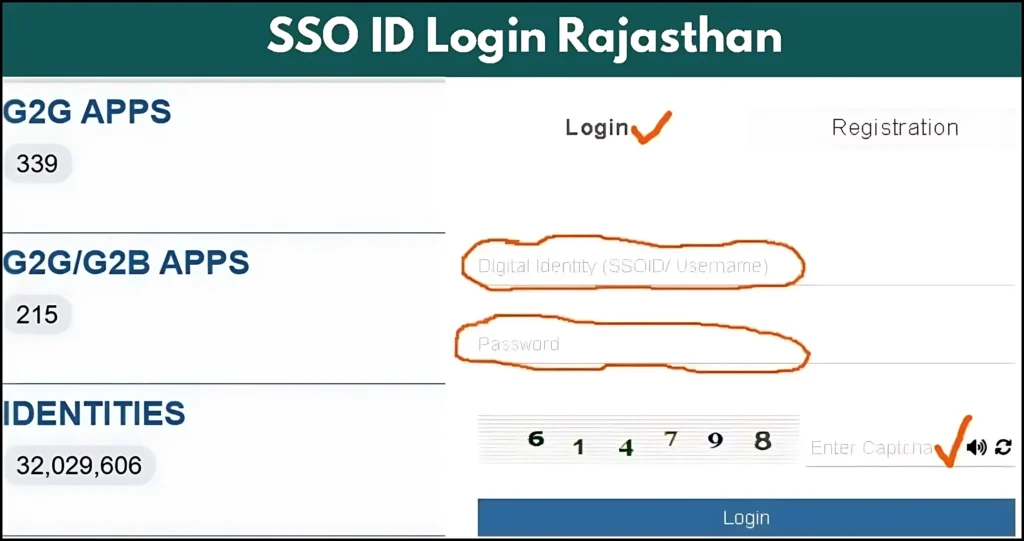
SSO Login एक authentication system पर आधारित है जिसमें user की identity verify की जाती है। जब login successful होता है तो system एक secure digital session create करता है जो connected services को access करने देता है।
Process आमतौर पर इस तरह काम करता है
SSO Login कैसे करें Step by Step Guide
सबसे पहले browser में sso rajasthan gov in website open करें।
Homepage पर दिखाई देने वाले login button पर click करें।
अब अपना registered SSO ID और password enter करें।
Security verification के लिए OTP या captcha भरना होगा। OTP registered mobile number या email पर आता है।
Login successful होने के बाद आपका SSO dashboard open हो जाएगा जहां से कई government services access की जा सकती हैं।
SSO ID क्या होती है
SSO ID एक unique username होती है जो registration के समय create होती है। यह ID आपकी digital identity होती है जिसके माध्यम से government services access की जाती हैं।
इस ID से कई services का उपयोग किया जा सकता है जैसे
SSO ID Registration कैसे करें
सबसे पहले official SSO portal open करें।
Homepage पर New User Register option पर click करें।
Name mobile number email address और Aadhaar या Jan Aadhaar details enter करें।
Registered mobile number पर OTP आएगा जिससे identity verify की जाएगी।
Verification complete होने के बाद आपकी SSO ID generate हो जाएगी जिसे future login के लिए इस्तेमाल किया जाएगा।
SSO Login Problems और Solution
Login page पर forgot password option का उपयोग करें और OTP verification के बाद नया password set करें।
Network check करें और resend OTP option select करें। कभी कभी server delay भी हो सकता है।
लगातार गलत password डालने पर account temporary lock हो सकता है। कुछ समय बाद फिर से login करें।
Updated Chrome या Firefox browser इस्तेमाल करें और cache cookies clear करके login करें।
SSO Login Security Tips
Digital portal इस्तेमाल करते समय कुछ security practices follow करनी चाहिए।
SSO System के Real World Use
Single Sign On technology केवल government systems में ही नहीं बल्कि कई sectors में उपयोग हो रही है।
Corporate companies में employees email HR tools और internal systems access करने के लिए SSO का उपयोग करते हैं। Universities students को learning platforms access करने के लिए SSO systems देती हैं। Healthcare sector में doctors secure patient records access करने के लिए centralized login का उपयोग करते हैं।
Rajasthan SSO portal इसी technology का example है जो लाखों users को government services तक आसान access देता है।
FAQs
Final Words
SSO Login Rajasthan government का एक महत्वपूर्ण digital platform है जो citizens employees और businesses को कई government services एक ही portal से access करने की सुविधा देता है।
एक secure SSO ID के माध्यम से user आसानी से scholarship pension E Mitra और कई अन्य services का उपयोग कर सकता है। सही registration strong password और safe login practices अपनाकर इस portal का पूरा लाभ लिया जा सकता है।


