
SSO Alert Settings: Services Alerts Customize करें
Multiple apps और accounts को manage करना कभी-कभी confusing हो सकता है, लेकिन Single Sign-On (SSO) इसे आसान बनाता है। एक ही login से आप कई services तक access पा सकते हैं।
लेकिन, convenience के साथ responsibility भी आती है—अगर कोई आपका SSO account compromise कर ले, तो वो सभी connected services तक access पा सकता है।
इसलिए, SSO alerts को customize करना बहुत जरूरी है। यह आपको important events के बारे में तुरंत notify करता है, जिससे आप unauthorized access से बच सकते हैं।
SSO Alerts Customize करने का Importance
SSO alerts आपके digital safety का पहला line of defense हैं। ये notify करते हैं:
Unknown device या location से login होने पर।
Password updates या security settings में बदलाव।
Failed login attempts या MFA failures।
Sensitive apps जैसे HR या finance systems में access।
Example: अगर payroll system में कोई unknown location से login करता है और आपको alert मिलता है, तो आप तुरंत action ले सकते हैं और data breach रोक सकते हैं।
Tip: पहले high-priority services के लिए alerts focus करें।
Important Services Identify करें
पहले decide करें कि किन services के लिए alert जरूरी है। ये usually high-value accounts होते हैं।
Common critical services
Gmail, Outlook, Slack, Teams
QuickBooks, PayPal, Stripe
Workday, BambooHR, ADP
AWS, Azure, Okta, OneLogin
Jira, Asana, Monday.com
Pro tip: Services को high, medium, low priority में rank करें। पहले high-priority services के alerts set करें।
SSO Management Portal Access करें
Most SSO providers alert settings centrally manage करने की सुविधा देते हैं।
Popular platforms example
- Admin → Security → Notifications
- Services select करके alerts enable करें
- Azure Active Directory → Security → MFA/Sign-in risk policies → Notifications
- App या user group per alerts configure करें
- Users → Alerts → App Notifications
- Per app alert enable/disable करें
Tip: अगर alert option नहीं दिख रहा, तो IT admin से help लें।
Alert Type और Delivery Method Choose करें
Alerts customize किए जा सकते हैं: event type, delivery method, frequency के हिसाब से।
Event Types
Success और failed attempts
Failed multi-factor authentication
Credential update
Unknown device/location access
Delivery Methods
Standard notifications
High-priority events के लिए immediate alerts
SSO mobile app के जरिए
Slack, Teams
Frequency
High-priority events के लिए instant notification
Daily/weekly summary for low-priority apps
Tip: Sensitive apps जैसे finance या admin dashboards के लिए multiple delivery channels enable करें।
Recipients Assign करें
Some SSO platforms multiple recipients को alert भेजने की सुविधा देते हैं:
सिर्फ आपका email/phone
IT team या managers
Unacknowledged alerts auto-forward
Pro tip: Shared services के लिए team notifications enable करें।
Alerts Test करें
Testing जरूरी है ताकि alerts सही काम करें:
Tip: Separate test account/device use करें ताकि main inbox spam ना हो।
Alerts Review और Update Regularly करें
Digital environment बदलता रहता है, इसलिए:
Pro tip: Team या IT department के लिए alert settings document करें।
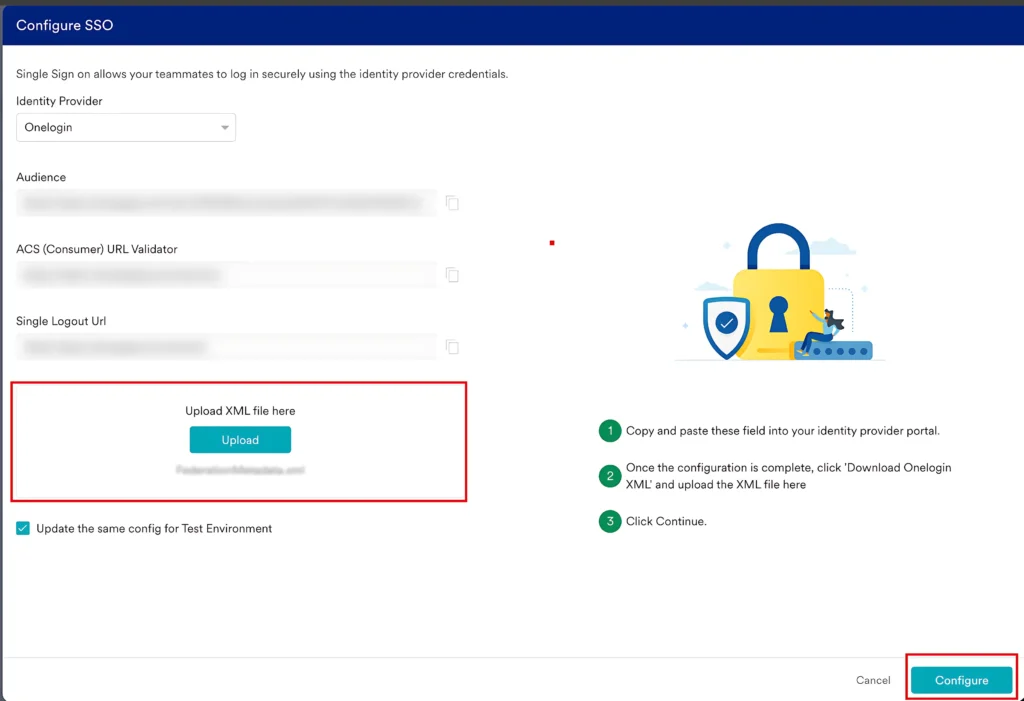
Advanced Tips for SSO Alerts
Unusual login pattern detect करने पर automatic notification
Stronger security layer
Centralized monitoring & auditing
Real-time alerts सिर्फ high-risk activities के लिए
FAQs
Final Words
SSO alerts customize करना छोटी चीज़ लग सकती है, लेकिन यह आपके digital security के लिए बहुत powerful है। High-priority services focus करें, alert preferences clear रखें, test करें और regular review करें।
Alerts को सोचें digital early-warning system के रूप में—right notifications आपको potential problems से पहले aware कराते हैं।


